Article: Rotation Application List Export content
The Rotation Applications feature allows members to submit rotation requests directly to your organization. When enabled, administrators can review submitted applications and export them for offline review or for record-keeping purposes. This is an additional ACEMAPP feature—please contact ACEMAPP Support for assistance with enablement.
Step 1: Access the Rotation Applications Page
On your main home screen, click the "Rotation Applications" button.
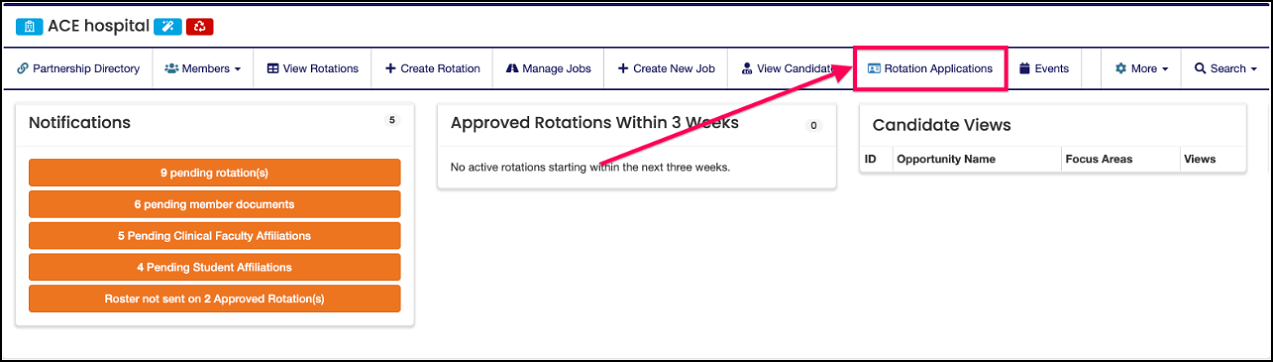
Step 2: Open the Submitted Applications List
On the Rotations Applications screen, click on the "List" icon next to the application to open that applications submitted table.
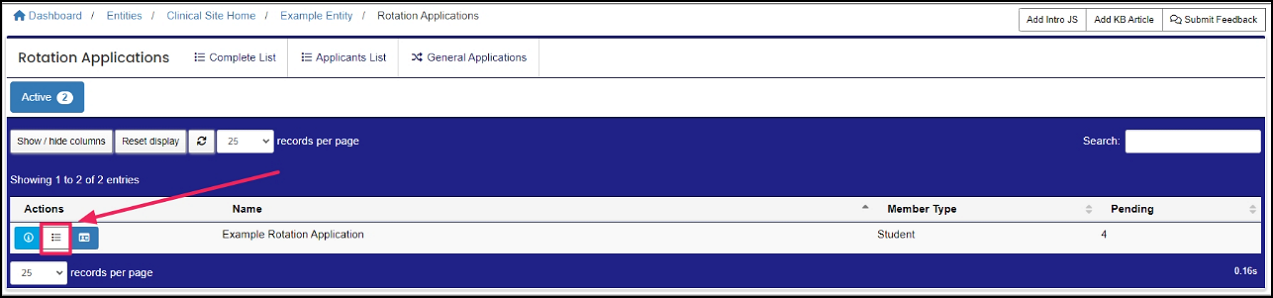
Step 3: Open the Export Options
Next, click on the "Export Applications" icon found above the table.
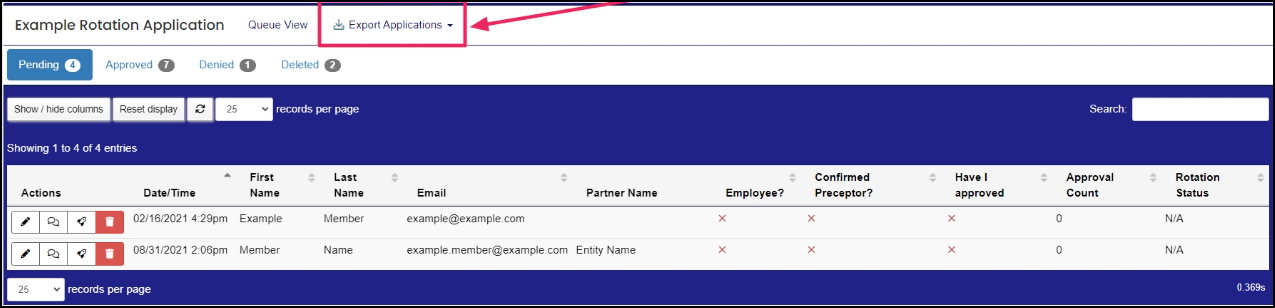
Step 4: Choose an Export Type
- Select the appropriate export selection from the drop-down menu:
- Export Pending Applications
- Export Approved Applications
- Export Pending and Approved Applications

Step 5: Download the File
Click "Download." Your export will download as a CSV file.

A request made by a member for a rotation opportunity or to affiliate with an entity.
A rotation is a scheduled clinical experience.
A request made by a member for a rotation opportunity or to affiliate with an entity.
A rotation is a scheduled clinical experience.
A request made by a member for a rotation opportunity or to affiliate with an entity.
A rotation is a scheduled clinical experience.
A request made by a member for a rotation opportunity or to affiliate with an entity.
A request made by a member for a rotation opportunity or to affiliate with an entity.
A rotation is a scheduled clinical experience.
A request made by a member for a rotation opportunity or to affiliate with an entity.
A request made by a member for a rotation opportunity or to affiliate with an entity.
A request made by a member for a rotation opportunity or to affiliate with an entity.
A request made by a member for a rotation opportunity or to affiliate with an entity.
