Article: LMS Report content
School and clinical site coordinators can run the LMS (Learning Management System) Report to view the status of all learning materials for their members (students, faculty, etc.). The report will indicate whether the learning module is complete or incomplete for the member, along with the date of completion. This guide will walk you through the process of running the LMS Report.
Step 1: Access the Reporting Dashboard
To access your Reporting Dashboard, click the "Reporting" button from the main navigation bar on your homepage.

Step 2: Run the LMS Report
On the Reporting Dashboard, click the "View All" tab on the right. You can look up the report by typing "LMS" in the search bar. Once you locate the report, click the "Run Report" button.
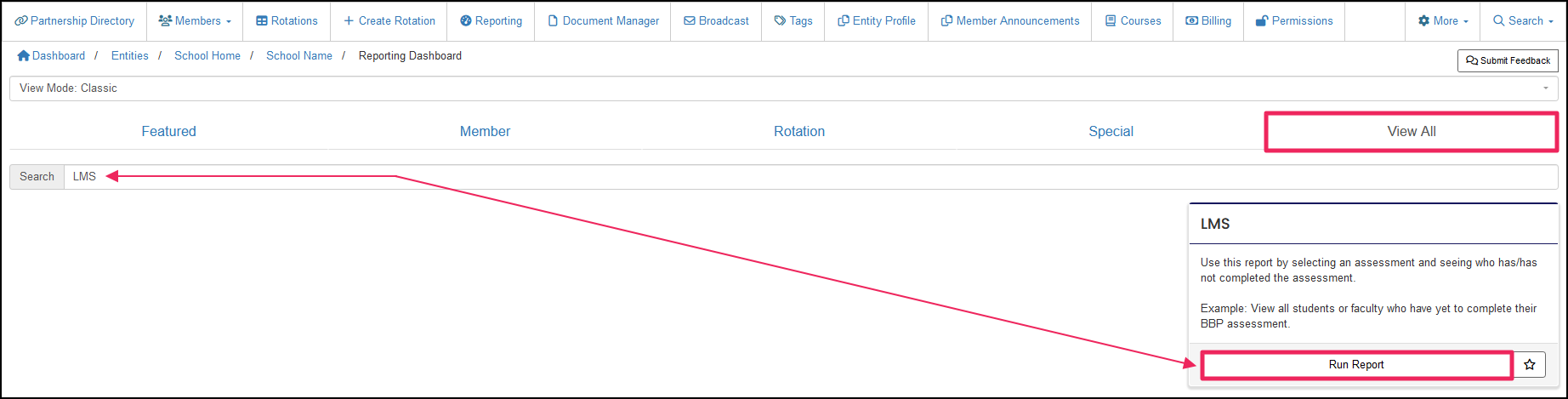
The LMS Report can be pulled by affiliation or rotation. The report by affiliation will pull data from members who are directly connected to your organization and will display your organization's requirements. The report by rotation will pull data from members who have been assigned to rotations and will display the rotation requirements.
NOTE: For school coordinators who want to view the site's learning modules, please skip to the LMS Report View by Rotation section.
LMS Report View by Affiliation
Step 3: Select View by Affiliation
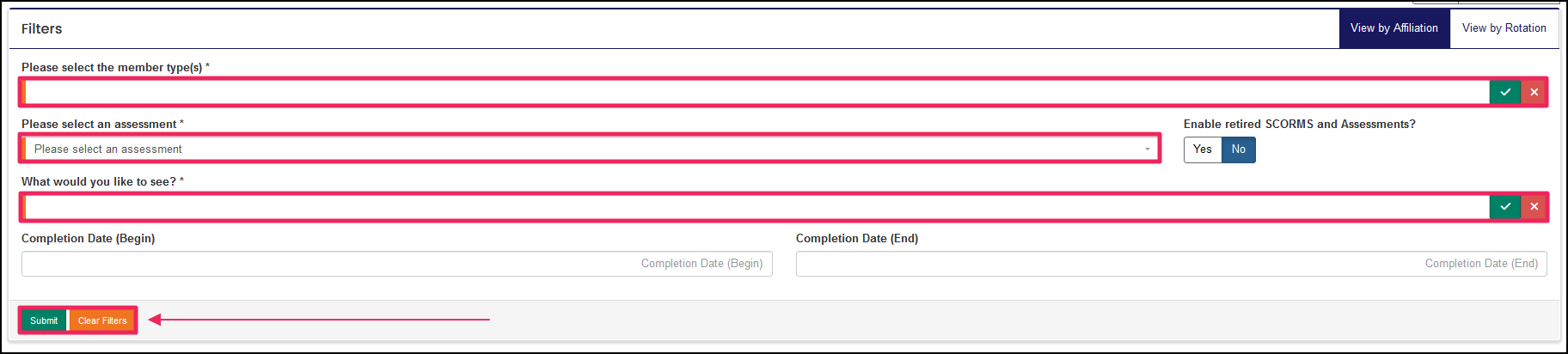
On the LMS Report, click the "View by Affiliation" tab in the upper-right-hand corner.

Step 4: Filter Data
Select how you want to view the report and enter the required fields within the Filters table. The following required filters must be set:
- Please select the member type(s)
- Please select an assessment
- What would you like to see?
NOTE: Any field with an orange bar is required to have data entered.
Optional Filters
- Completion Date (Begin)
- Completion Date (End)
Once done, click the green "Submit" button to run the report and view the results.
LMS Report View by Rotation
Step 3: Select View by Rotation
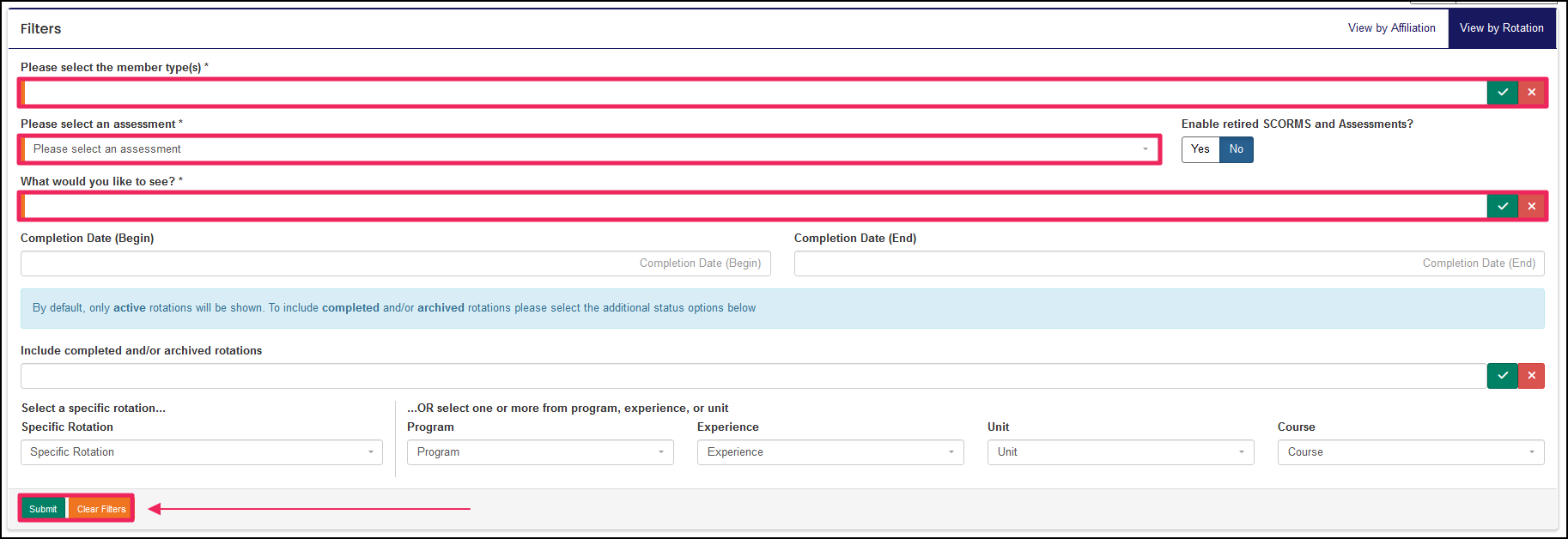
On the LMS Report, click the "View by Rotation" tab in the upper-right-hand corner.

Step 4: Filter Data
Select how you want to view the report and enter the required fields within the Filters table. The following required filters must be set:
- Please select the member type(s)
- Please select an assessment
- What would you like to see?
NOTE: Any field with an orange bar is required to have data entered.
Optional Filters
- Completion Date (Begin)
- Completion Date (End)
- Include completed and/or archived rotations
- Specific Rotation
- Program
- Experience
- Unit
- Course
Once done, click the green "Submit" button to run the report and view the results.
A course, module, or assessment.
An Affiliation is a connection between a Member and an Entity.
Affiliations define Member Types and often include Graduation or End Dates.
A rotation is a scheduled clinical experience.
An Affiliation is a connection between a Member and an Entity.
Affiliations define Member Types and often include Graduation or End Dates.
A rotation is a scheduled clinical experience.
A rotation is a scheduled clinical experience.
An Affiliation is a connection between a Member and an Entity.
Affiliations define Member Types and often include Graduation or End Dates.
An Affiliation is a connection between a Member and an Entity.
Affiliations define Member Types and often include Graduation or End Dates.
An Affiliation is a connection between a Member and an Entity.
Affiliations define Member Types and often include Graduation or End Dates.
A rotation is a scheduled clinical experience.
A rotation is a scheduled clinical experience.
A rotation is a scheduled clinical experience.
A rotation is a scheduled clinical experience.
A rotation is a scheduled clinical experience.
