Article: Accessing Students Transcripts content
Accessing a student’s transcript is a quick and effective way to review and export key information stored in ACEMAPP, including Assessment History, Course History, Requirements, Rotation History, and more.
Step 1: Navigate to the Student Member List
From your ACEMAPP home page, click the "Members" button. Under "Affiliation," click "Student."

Step 2: Open the Student Transcript
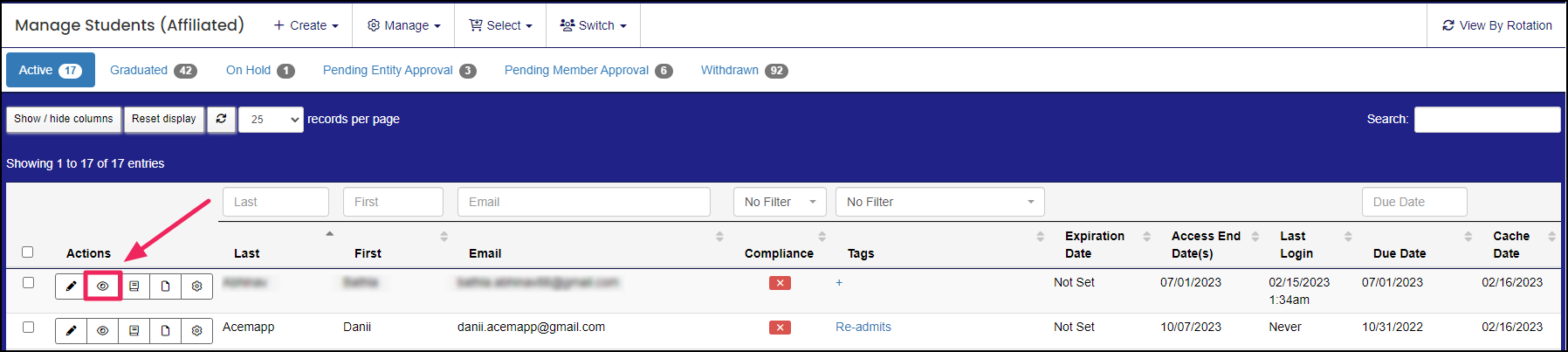
In the Manage Students (Affiliated) table, click on the "View" (eye) icon of the member you would like to generate a transcript for.
Step 3: Generate the Student Transcript
Use the "Generate Default Printable Transcript" and "Generate Summary Printable Transcript" buttons to generate and download a transcript for the selected student.
Click on either button to generate a transcript.
- The Summary transcript contains detailed requirements and license information.
- The Default transcript is a condensed transcript of what the student has completed in ACEMAPP.

Step 4: Download the Transcript
After you click to generate a transcript, the button will turn green. Click the button again to download the transcript.

Step 5: Review the Student Transcript
Once you have downloaded a transcript, you can review the student's information. Below is an example of a Default Transcript for a student:
A requirement is an item a member may need to complete based on their affiliation to an entity or rotation assignment.
A rotation is a scheduled clinical experience.
An Affiliation is a connection between a Member and an Entity.
Affiliations define Member Types and often include Graduation or End Dates.
